
As a creator management professional, I interact with creators every single day. My responsibilities range from finding the right creators, approaching them to join campaigns, to managing posting schedules and deliverables across multiple platforms such as TikTok, Instagram, Shopee, etc.
One of the most time-consuming parts of this job has always been finding and shortlisting creators. Traditionally, this process involved manual research, subjective judgment, and repetitive work. With the help of AI, this workflow has become significantly faster, more objective, and more scalable.
AI does not replace the role of a creator manager. Instead, it helps transform the role from manual executor to strategic decision-maker.
How to Use AI for Finding & Shortlisting Creators
This is the tutorial I used to generate data using AI.
STEP 1: Build Creator Database (TAB 1 – CREATOR_DATABASE)
This tab contains master creator data that you only need to update occasionally.
Columns include:
- Username
- Channel (TikTok / Instagram)
- Niche
- Followers
- GMV
- Content Style
STEP 2: Define Campaign Requirements (TAB 2 – CAMPAIGN_INFO)
Each row represents one campaign.
Key fields include:
- Campaign Name
- Brand
- Objective (Awareness / Conversion)
- Target Audience
- Key Message
- Channel
STEP 3: Let AI Evaluate Creators (TAB 3 – AI_SCORING)
This tab is the core of the AI workflow.
Columns include:
- Username
- Campaign name
- AI Prompt (AUTO)
- AI Output (paste it from ChatGPT)
- Total score
- Recommendation (APPROVE / CONSIDER / SKIP)
📌How to Use:
- Input:
- Username (column A2)
- Campaign Name (column B2)
- Input prompt for column C2 (a prompt will appear automatically)
FORMULA AI PROMPT (for column C2)
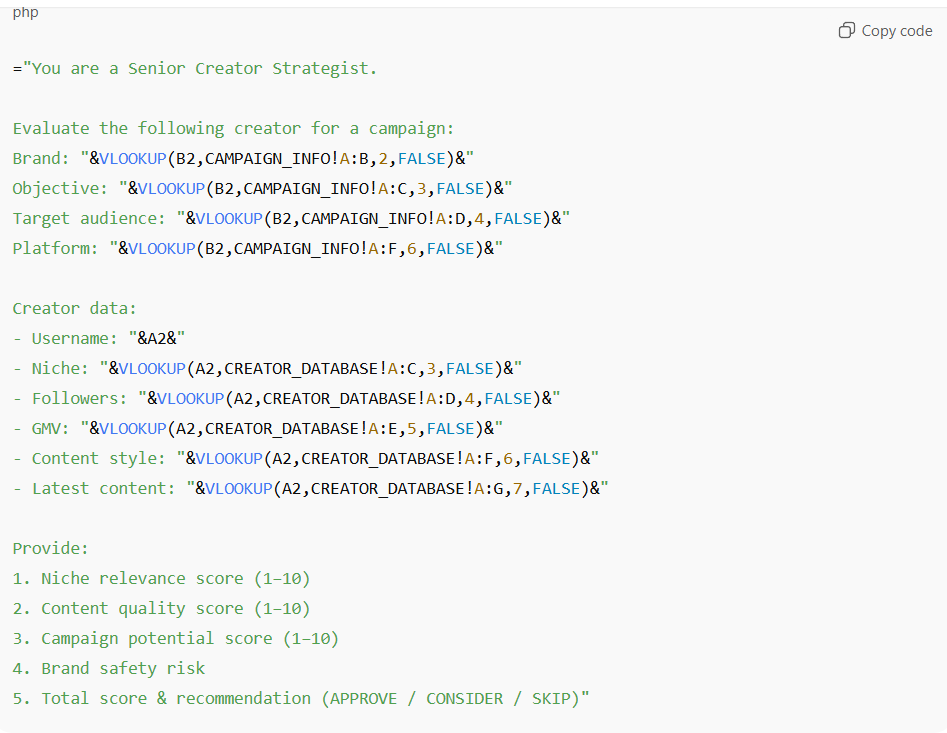
Copy this promp to column C2:
=”You are a Senior Creator Strategist.
Evaluate the following creator for a campaign:
Brand: “&VLOOKUP(B2,CAMPAIGN_INFO!A:B,2,FALSE)&”
Objective: “&VLOOKUP(B2,CAMPAIGN_INFO!A:C,3,FALSE)&”
Target audience: “&VLOOKUP(B2,CAMPAIGN_INFO!A:D,4,FALSE)&”
Platform: “&VLOOKUP(B2,CAMPAIGN_INFO!A:F,6,FALSE)&”Creator data:
- Username: “&A2&”
- Niche: “&VLOOKUP(A2,CREATOR_DATABASE!A:C,3,FALSE)&”
- Followers: “&VLOOKUP(A2,CREATOR_DATABASE!A:D,4,FALSE)&”
- GMV: “&VLOOKUP(A2,CREATOR_DATABASE!A:E,5,FALSE)&”
- Content style: “&VLOOKUP(A2,CREATOR_DATABASE!A:F,6,FALSE)&”
- Latest content: “&VLOOKUP(A2,CREATOR_DATABASE!A:G,7,FALSE)&”
Provide:
- Niche relevance score (1–10)
- Content quality score (1–10)
- Campaign potential score (1–10)
- Brand safety risk
- Total score & recommendation (APPROVE / CONSIDER / SKIP)
3. Copy the prompt (from column C2) and paste it into ChatGPT
4. Paste the AI output into column D
RESULT
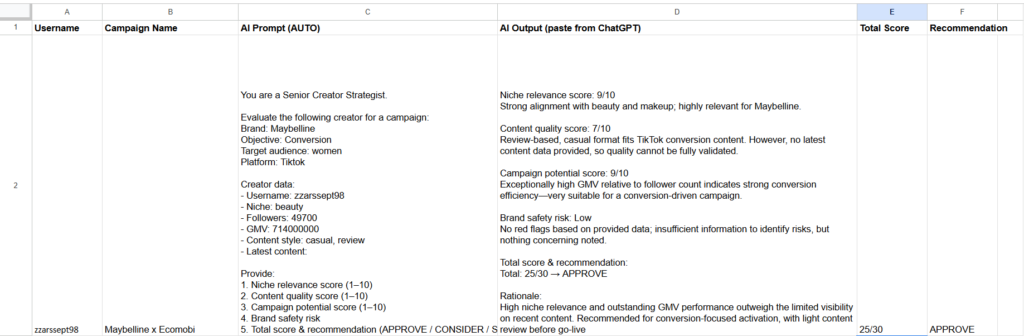
How This Improves Creator Managers Workflow
Before AI:
- 3-5 hours per campaign shortlist
- Manual comparisons
- High risk of inconsistency
After AI:
- 60-90 minutes per shortlist
- Clear scoring logic
- Stronger, data-backed recommendations
Conclusion
AI has fundamentally changed how I finding and shortlisting creators. By combining structured data with AI evaluation, creator managers can work faster, think more strategically, and deliver better results for brands.